200+
Orphaned Accounts
Remediated

Effective MFA means coverage across every access point: VPN, email, cloud applications, administrative consoles, and remote desktop. Partial MFA deployments leave gaps that attackers find quickly. We map every access point before deployment.

Not all MFA is equal. SMS-based codes and TOTP apps can be phished with real-time proxy attacks. We implement phishing-resistant MFA: FIDO2/WebAuthn hardware keys and passkeys: for high-value accounts and compliance-sensitive environments.

We configure conditional access policies that trigger step-up authentication based on risk signals: unusual location, new device, sensitive resource access: so MFA challenges appear when they matter most without degrading everyday user experience.

We integrate MFA into your existing identity infrastructure: Okta, Microsoft Entra ID, Ping, or Active Directory: so MFA becomes part of your SSO authentication flow and users authenticate once with strong assurance.

We define MFA policies: which users, which resources, which factor types: and implement enforcement that prevents bypass. Admin accounts and privileged roles receive the strictest requirements by default.

We design self-service enrollment flows, build helpdesk runbooks for common issues, and provide user communication templates so the rollout goes smoothly without IT being overwhelmed.
Understanding MFA
What is MFA?
Multi-Factor Authentication requires users to verify their identity using two or more factors from different categories: something they know (password or PIN), something they have (hardware key, authenticator app, or SMS code), or something they are (biometric). When one factor is compromised, the others still protect the account. MFA is the single most effective control for preventing unauthorized account access from stolen credentials.
Who requires it?
MFA is required by virtually every major compliance framework, HIPAA, PCI DSS, SOC 2, ISO 27001, CMMC, and NIST CSF all mandate or strongly expect MFA on privileged accounts and sensitive systems. Cyber insurance carriers now routinely deny claims or refuse coverage to organizations that did not have MFA enabled on the account or system involved in a breach. Many require it across all remote access as a policy condition.
Why does it matter?
Microsoft reports that MFA blocks over 99% of automated credential attacks. The majority of business email compromise, ransomware, and data breach incidents involve accounts that had no MFA enabled. Not all MFA is equally strong, SMS-based codes are vulnerable to SIM swapping and real-time phishing proxies. The right MFA factor for each access point depends on the risk profile of what it protects.
How is MFA deployed?
MFA deployment begins with mapping every access point, VPN, email, cloud apps, admin consoles, remote access, and assigning the right factor type for each risk level. FIDO2/WebAuthn hardware keys or passkeys for privileged and high-risk accounts. App-based TOTP or push MFA for standard users. Conditional access policies trigger step-up MFA for unusual login patterns. User enrollment and helpdesk readiness are planned alongside the technical deployment to avoid a rollout that stalls on user adoption.
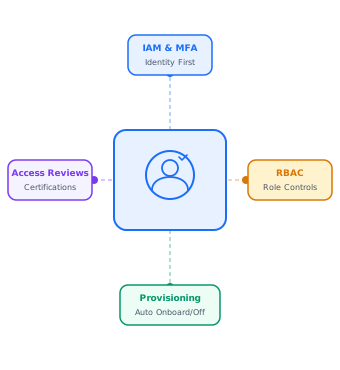
We had over 200 contractor accounts in Active Directory that nobody owned. garrisonOne mapped every identity, implemented PAM controls for privileged accounts, and set up automated provisioning and deprovisioning tied to our HR system. First audit after rollout, the finding list was empty.
Client results
Retail / SMB
A retail business with password sprawl across 20+ applications. garrisonOne deployed SSO with MFA across the full application stack in under six weeks.
Financial Services
Manual offboarding across 14 systems took two days. garrisonOne automated the full user lifecycle with HR-driven provisioning and role-based access, cutting offboarding to 10 minutes.
Industry focus

Penetration testing prices vary enormously, from a few thousand pounds for a focused web application test to well over £50,000 for a full red …
Read More
Both penetration testing and vulnerability assessments are designed to find weaknesses in your systems. But they work very differently, and confusing …
Read More
Every business has security weaknesses. The question is whether you find them first, or an attacker does. Penetration testing (also called pen …
Read MoreRelated Services: IAM Services | SSO Services | Zero Trust | PAM Services
Multi-factor authentication requires users to verify their identity using two or more factors from different categories: something they know (password), something they have (authenticator app or hardware key), or something they are (biometric). MFA prevents account takeover even when a password is compromised.
Microsoft research indicates MFA blocks over 99.9% of automated credential attacks. However, SMS and push notification MFA are vulnerable to sophisticated phishing. For high-value accounts, phishing-resistant FIDO2 keys provide near-complete protection.
TOTP generates a six-digit code in an authenticator app. Push MFA sends an approval prompt to a mobile device. FIDO2/WebAuthn uses a hardware key or device biometric and is phishing-resistant because authentication is cryptographically bound to the site being accessed. FIDO2 is the strongest option for privileged accounts.
Yes. PCI DSS 4.0 requires MFA for all access to the cardholder data environment. HIPAA requires access controls satisfiable with MFA. SOC 2 expects MFA for privileged access. CMMC Level 2 requires MFA for all non-local accounts. FTC Safeguards Rule requires MFA for systems accessing customer financial data.
Some MFA methods are vulnerable. SMS codes can be intercepted via SIM swapping. TOTP and push MFA can be phished with real-time proxy attacks. FIDO2 hardware keys cannot be phished because authentication is tied to the exact domain.
A focused MFA deployment for a mid-size organization typically takes two to four weeks including enrollment, policy configuration, and helpdesk preparation. Larger organizations may take two to three months for full coverage.
Resources
Company
Contact


